From inventory to auction to packed order.
Bring your inventory into one workspace, track what you paid, prepare marketplace listings, organize buyer boxes, and manage label printing—all with BinBoss.
14-day free trial. No card is collected at signup, so the trial cannot auto-charge you. Choose a paid plan to continue after it ends.
Know what you own—and what you paid.
Inventory lives in the same workspace you sell from, so cost information follows an item all the way to the profit report.
Manual entry that fits real stock
Add an item, duplicate a similar one, or edit rows in the table. Photos, SKU, category, condition, quantity on hand, reserved and available, plus optional sports-card details like player, set, grade and cert number.
Storage locations
Record shelf, bin or a custom location so you can find the item again. Storage locations are where stock lives; buyer boxes are temporary packing spots during a show — they are tracked separately.
What you actually paid
Enter a unit cost, or build a purchase lot and split its total — equally, manually, or weighted by values you enter. Shipping, buyer premiums and other acquisition fees are included and the split reconciles to the total, rounding included.
Search, filter, export
Filter by category, location, availability, listing status and missing cost, switch between table and photo grid, and export your inventory to CSV. Every quantity change is written to an item history you cannot silently edit.
What you can upload today
Inventory items are created in BinBoss and export to CSV. File import with column mapping and a row-by-row preview is available for sales history in CSV and TSV files. Inventory-item import and assisted extraction from PDFs or photos are not built yet — we would rather say so than have you plan around them.
Prepare your inventory for Whatnot.
Select items, review the listing details, check the photo links, export a CSV, then upload it in Whatnot yourself. This is file-based listing preparation — not direct publishing and not live synchronization.
Currently supported template
Whatnot Bulk Upload Template (US / AU / NL, all categories except Coins & Money)
Regions: United States, Australia, Netherlands. Other regions and the Coins & Money template stay disabled in the exporter until their current official files are obtained and verified.
Template support varies. Current exports are validated by BinBoss; successful import into Whatnot is still being verified.
- Up to 8 image-link fields in the current template.
- Included images need public HTTPS links that open without a login.
- Photos may be omitted where the template permits empty image columns.
- You can create a public listing copy of a private photo; the copy is available until it is deleted or service availability changes, and the original stays private.
- Purchase cost, supplier, storage location and private notes are excluded from the listing export.
- Prepared, Exported and Confirmed listed are tracked separately — exporting a file never changes your stock.
Keep every buyer's order organized.
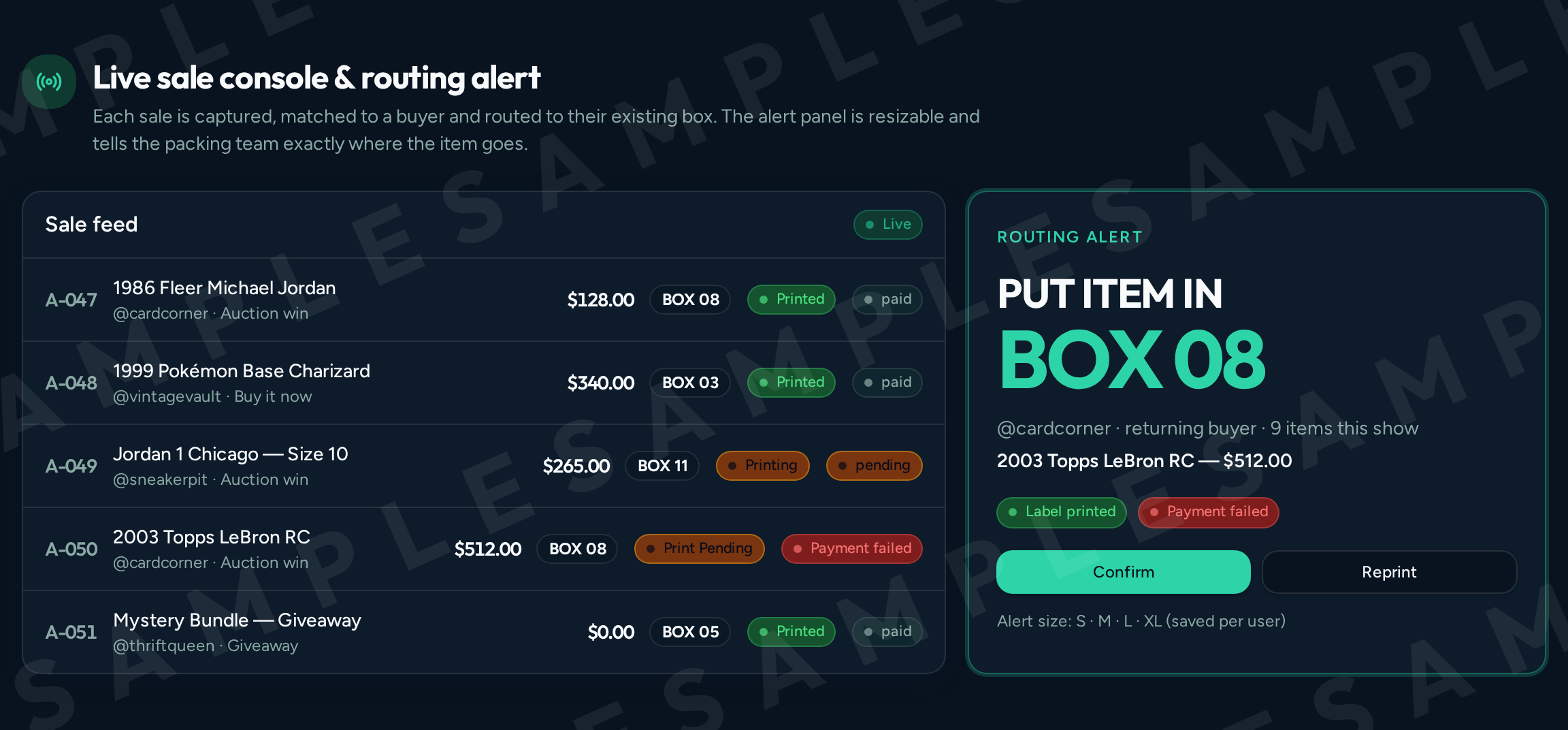
Whether a sale arrives from a marketplace connection or you tap it in yourself, BinBoss assigns the buyer's box, queues the label and keeps the packing team pointed at the right spot.
One box per buyer, all show
A buyer's second and twentieth win route to the box they already have, so there is nothing to look up mid-show.
Big, readable box call-outs
The routing alert shows the box number in large type with the buyer, item and price, in a panel size you choose.
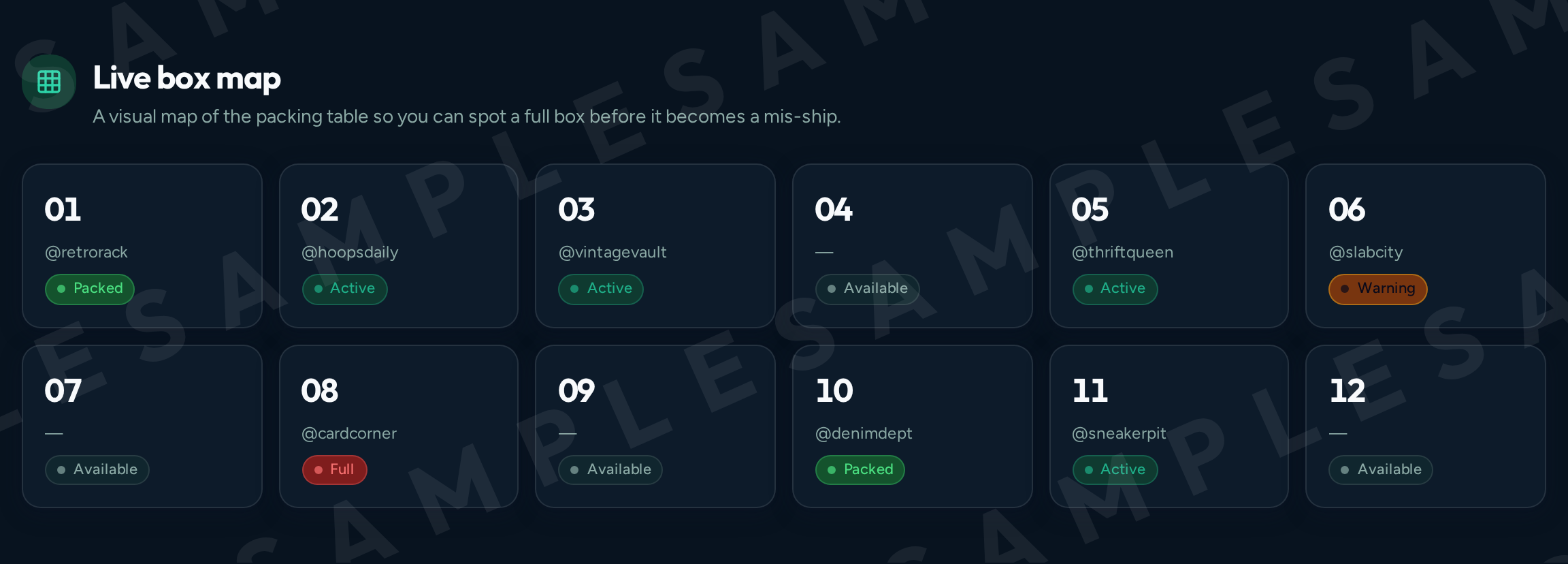
Live box map
A grid of your packing table showing available, active, warning and full boxes as the show runs.
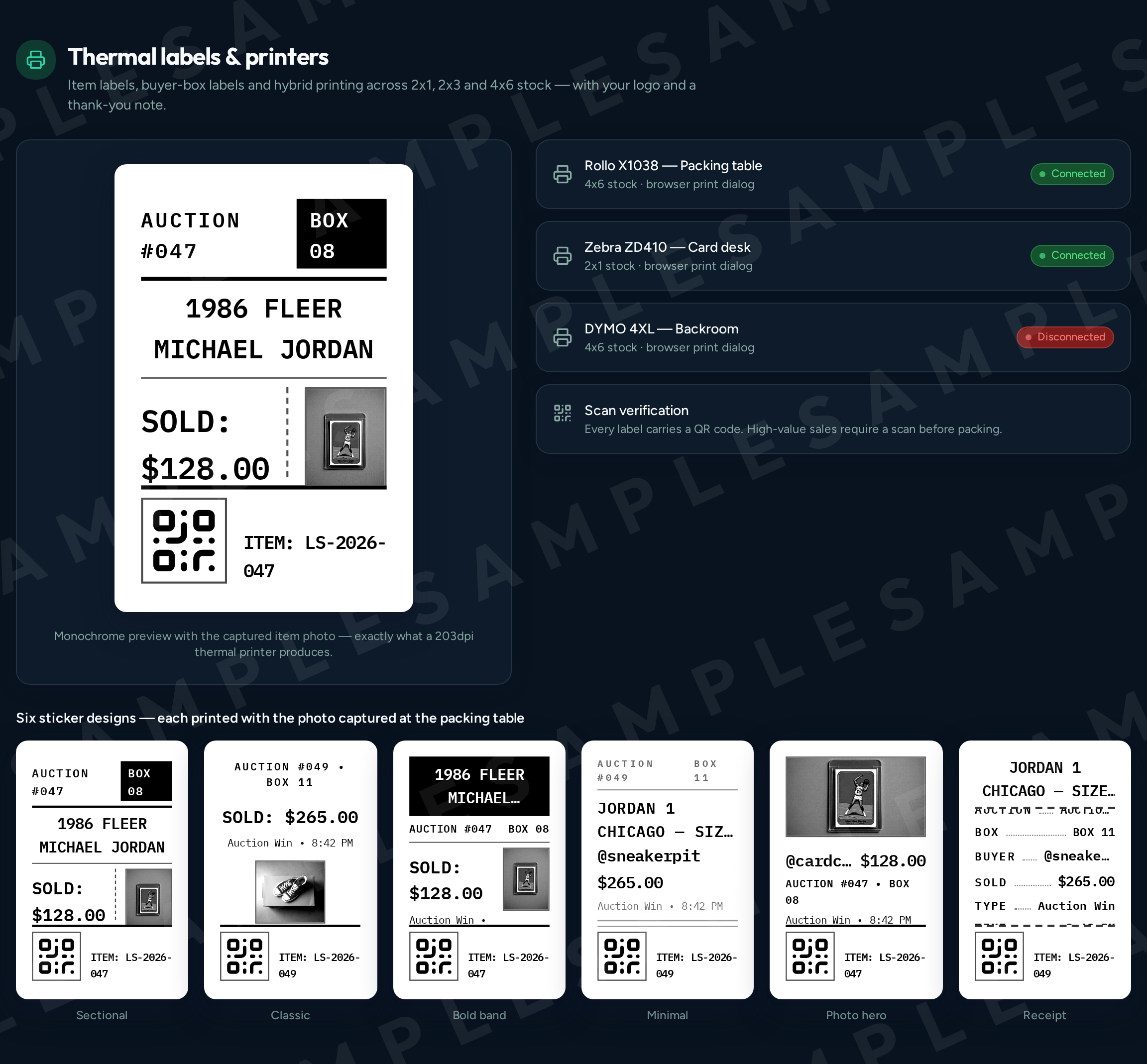
Print queue you can recover
Jobs show queued, printing, printed or failed, with reprint and retry actions. A job accepted by the queue is not yet proof that paper came out.
Organizational labels
Six designs across 1x3 to 4x6 sizes, portrait or landscape, with logo, QR code and item photo. These are packing labels for your own workflow — not carrier shipping labels and not purchased postage.
Pack and close out
Move each buyer through Organized, Verification, Packing, Packed and Shipped, with printable packing slips per buyer.
Marketplace connection
Marketplace connections bring sales into BinBoss. Automatic capture runs through the BinBoss desktop browser and today targets Whatnot only, in beta — it needs the desktop app, a signed-in seller session and the exact show link. Every other platform uses rapid manual entry or a sales file import, which route buyers to boxes exactly the same way.
Desktop print agent
The desktop print agent connects BinBoss to printers installed on your computer and reports queue and printer status back. It does not detect auctions. Printing is currently verified against simulated printers and automated tests; an end-to-end test on Windows thermal hardware has not been completed, so treat printer support as unverified until you run your own test print.
See what each sale earns.
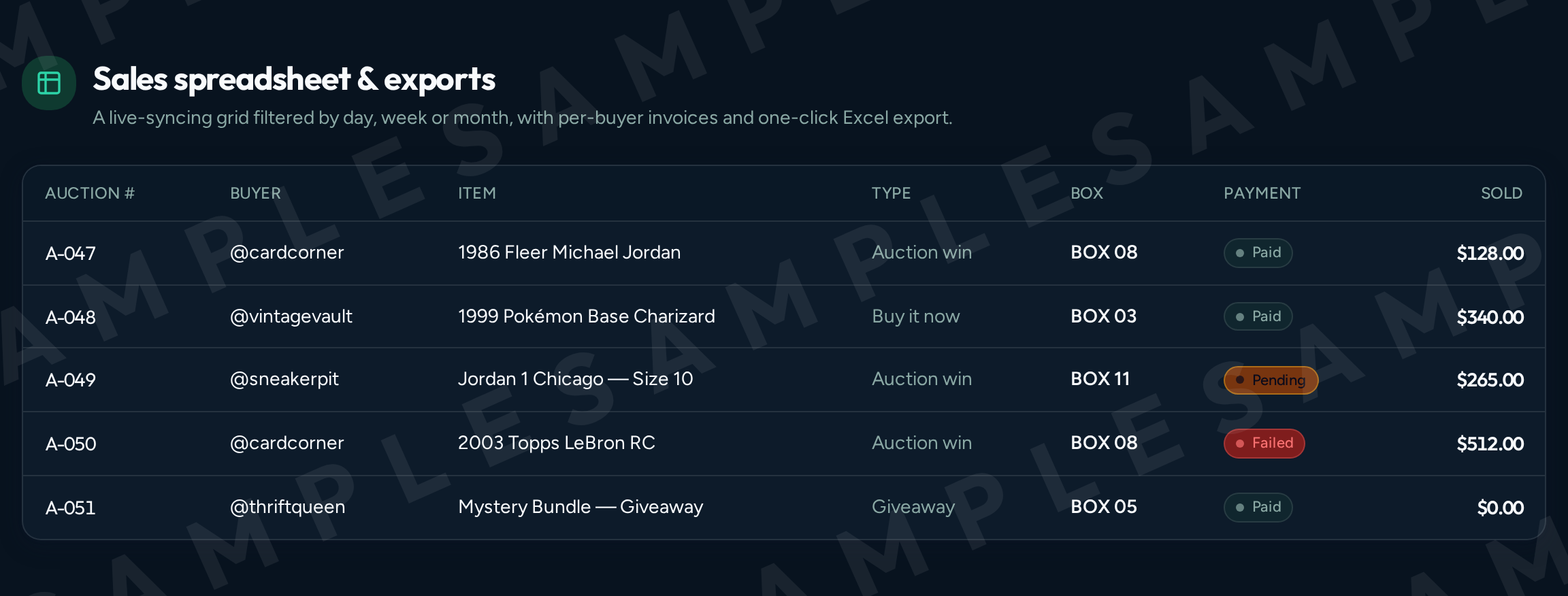
Sale amount, acquisition cost, marketplace and processing fees, shipping and adjustments — reported per item, per show and per period.
- Estimated fees and actual reconciled fees are shown separately, and estimate rates are configurable rather than hard-coded.
- Estimated profit is labeled apart from reconciled results.
- An item with no recorded cost shows “cost missing” — never a silent zero.
- Costs are snapshotted when an item sells, so editing a purchase price later does not rewrite past profit.
- These figures are sale contribution profit: revenue minus recorded costs and fees. They do not include business overhead, so they are not full net profit.
Get ready to promote your next show.
Enter your show details, featured items and any giveaways, and BinBoss drafts the promotional material for you to review, edit and post yourself.
Everything is a draft until you approve it. BinBoss does not post to social media, send emails or send text messages on your behalf — you copy or download the content and share it yourself. Included campaign volume depends on your plan, and graphics are available on Pro and Team. More about AI Show Promoter
How BinBoss fits your week
Add inventory
Enter items by hand or duplicate what you already have, with photos, quantities, locations and costs.
Prepare listings
Review listing details, check photo links, and export a file for a supported marketplace template.
Organize sales
Capture sales with a supported connection or rapid manual entry, and route each buyer to a box.
Pack and review
Work the print queue and fulfillment board, then review costs, fees and profit per sale or per show.
Simple, honest pricing
14-day free trial on every plan. No card required. Choose a paid plan to continue after your trial.
2 months free on annual billing
Starter
$19/mo
For new and solo sellers who need dependable buyer-to-box routing and basic show promotion.
- 1 user, 1 printer
- 8 live shows per month
- Buyer-box routing + repeat buyer routing
- Basic item labels (username, Auction #, Box #, title, qty, sale type)
- Optional sold-price field
- Buyers & Boxes list + Live Box Map
- Basic printer status
- 2 basic AI promotional campaigns per month
- AI show title, show description and a basic social caption
- Copy and download generated content
- 30-day history
Team
$99/mo
For growing live-selling businesses with multiple team members, packing stations and brands.
- Up to 10 users, 5 printers
- Multi-station workflow
- Advanced role-based permissions
- Packer assignments
- Manager approval for reprints & reassignment
- Mandatory placement confirmations
- Unlimited history + exportable reports
- Advanced audit log & team performance views
- Priority support
- 30 complete AI promotional campaigns per month
- Multiple brand profiles, shared campaign templates and team campaign assignments
- Content approval workflow, approval history and publishing permissions
- Advanced campaign calendar + campaign performance reporting
AI Campaign Boost — optional add-on
Create more auction marketing campaigns without changing your main BinBoss plan.
Added from Billing inside BinBoss once you have an active plan.
$19/mo
Add AI Campaign Boost| Compare plans | Starter | Pro | Team |
|---|---|---|---|
| Monthly price | $19 | $49 | $99 |
| Users | 1 | 3 | 10 |
| Printers | 1 | 2 | 5 |
| Live shows | 8 / month | Unlimited | Unlimited |
| History | 30 days | 12 months | Unlimited |
| Buyer-to-box routing | Included | Included | Included |
| Thermal labels | Basic | Photo + high-value | Photo + high-value |
| Scan verification | — | Included | Included |
| Profit reporting | — | Included | Included |
| AI campaigns per month | 2 | 10 | 30 |
| Promotional graphics | — | Included | Included |
| Content calendar | — | Included | Advanced |
| Brand profiles | 1 | 1 | Multiple |
| Team approvals | — | — | Included |
| Audit logs | — | — | Included |
| Priority support | — | — | Included |
One AI campaign may include multiple posts, reminders and content formats created for one auction show.
Frequently asked questions
Straight answers about what works today, and what does not yet.
One workspace, from intake to packed order
Start a 14-day trial, add a few items, and run your next show with buyer boxes and labels already sorted.